Halt And Catch Fire...

Martin Scorsese's "Street Of Dreams"
For the summer of 2013, I was the Assistant Editor for Kevin Tent ACE on a project few ever get to do. Martin Scorsese was directing a commercial campaign for Dolce & Gabbana, and we were brought in to do it. "But why not Thelma?" you ask... Well she was busy working around the clock on a certain Oscar-nominated movie you might've heard of, so she wasn't available. By some act of God, Kevin got the call. Here is the complete director's cut that we made and used for the entire campaign's different edits (twenty-six different finished spots!). Enjoy! https://www.youtube.com/watch?v=YO2fTlldqds
Automatic Duck Somewhat-Almost-Best Practices
In my travels, I’ve had to do a fair number of Automatic Duck project conversions. While I was learning this process, I found that there wasn’t much good information containing tips and tricks about making this process smooth. Especially now with the exodus from Apple because of FCPX, streamlining this process is more essential now than ever. I don’t propose to know all the answers, but I thought it was high time somebody started putting down their experiences so that we can start working towards some kind of a “Best Practices” document. I’m humble about my experience here, but I will say that I’ve done it a fair amount and I think my tips are good. I’d love to hear what you think. Please leave a note in the Comments section and tell me what I got right or wrong. Quick note: What I’ll talk about here is transferring between Avid and Final Cut Pro, because that’s what I have experience doing. However, since Adobe After Effects workflows are prevalent nowadays as well, I’d love to hear about your experiences there. Please, leave comments.
WHAT IS AUTODUCK?
Automatic Duck is shorthand for a number of programs developed by Wes Plate as a way to move editor sequences between Avid/Apple/Adobe products. Now that Wes has joined Adobe, his programs are now thankfully free to download. The apps are basically plugins for Final Cut Pro 7 and Adobe After Effects, so you’ll need one of these apps (as well as Avid Media Composer, if that’s part of your workflow) in order to transfer your footage.
HOW AUTODUCK WORKS:
- You can only send footage between different programs via sequences. There is no way to transfer whole projects at one time.
- Automatic Duck will take your sequence (and if you choose, your media) and convert it into files to import into another editing application. It can retain many simple effect information and titles, but everything must be checked to ensure accuracy.
- You can send media as either sequence information alone (where you’ll import/relink media after), or you can have Automatic Duck convert your media during the export/conversion process.
- When it comes to exporting media, you should figure what stage you’re at in the post process. If you’re still in offline, you should maintain the resolution of something like DNx36/ProRes(LT), if you’re editing in 23.98 FPS. If you are ready to finish your project, I’d transfer at DNx220X/ProRes4444.
- Remember that for every sequence you send, you create new copies of the clips in that sequence. Your new clips will not reference any clip from other imported sequences, even if it's the same clip. So, if you add a locator to one copy of the clip, it won’t appear in another matching clip if it was brought in from a different sequence.
MAKING THE SMOOTH TRANSITION:
- Key to successful transfer: tape names and timecode. Make sure your clips ALL have proper tape names assigned. There is really no substitute for this. Your project HAS TO BE well-logged. The safest way to reconnected media is using the tape name and timecode metadata. This way, you will also associate new media you create with a tape name, so it becomes easier to relink to new imported sequences.
- If you have audio from a separate source, be sure that the proper tape name for the sound roll is assigned to those clips as well.
DEALING WITH SYNCED/MULTICLIPS/GROUP CLIPS:
- Multiclips aka Avid Multigroups are NOT supported via AutoDuck Pro Import FCP or Pro Export FCP. That means you must collapse/remove your multigroups in your sequence before you export your sequence.
- PROTIP: assign locators to the slate mark frames and sync points for multigroups. Locators will transfer over between sequences, so it will be easier to see where your sync points are for re-grouping everything. At least you won't have to actually resync everything.
DEALING WITH BINS OF MEDIA:
- If you are trying to send scene bins, you should take your synced clips and string them out in a sequence. If you have multi-clips, you should take your video with synced audio for EACH CAMERA and drop it into the timeline. Once you bring the media into your other editor, you’ll need to rebuild your group clips, so act as if you never had them in the first place.
ONE WORKFLOW THAT MAY WORK FOR YOU:
- Make a duplicate of your current sequence edit.
- At the tail end of that sequence, add a stringout of all clips from the scenes referenced in your cut. By sending all your clips in one sequence, you can maintain the links between the clips you sort into scene bins and the clips in your sequence. Your sequence will be hours and hours long, but then you’ll have clips that link to each other. Now, editorial tools like Match Frame will work.
- Don’t convert your media with AutoDuck. Just batch import the Quicktimes for your shots in Avid. Too many times I’ve found that AutoDuck crashed overnight while trying to move clips from FCP<->Avid.
- If you’re moving your project from Avid->FCP, you have three choices depending on how your media was imported. If your media was captured to tape, your best bet is to recapture. If your media was imported tapelessly into Avid via AMA, I’d probably suggest just using FCP’s Log & Transfer to convert your media to FCP-friendly flavors, then relink those clips to the clips brought in via AutoDuck. Lastly, if your media was simply imported from Quicktime into Avid, just relink to the original media files!
BONUS: EXPORT AAFS FROM FINAL CUT PRO 7!
- For a long time, FCP7's support for normal ProTools workflows havs been sub-par. But by using AutoDuck's Pro Export FCP, you can now export new modern AAFs for your sound finishing needs. Since Pro Export FCP exports AAFs for Avid to import, and you have all the normal AAF export options available (consolidate whole clips, consolidate to folder, link to media, etc), you are now free from FCP's OMF 2.0 export function. Yay!
FINAL NOTES
- In my experience, transferring projects from FCP->Avid and relinking via AMA has rarely worked. Maybe you’ll get lucky, but I find that it just doesn’t always see the right clips. Your best bet is to batch import, since you can force Avid to recognize a certain clip as coming from a certain movie file.
- Automatic Duck is not a perfect app but it’s better than nothing. As with many “unsupported” workflows, GIVE YOURSELF TIME AND DO NOT EXPECT IT TO WORK RIGHT IMMEDIATELY. I can’t stress this enough. Run some tests. Decide what might be best. Don’t force it.LASTLY, and most importantly, please tell me about your experiences in the Comments section.
GOOD LUCK!
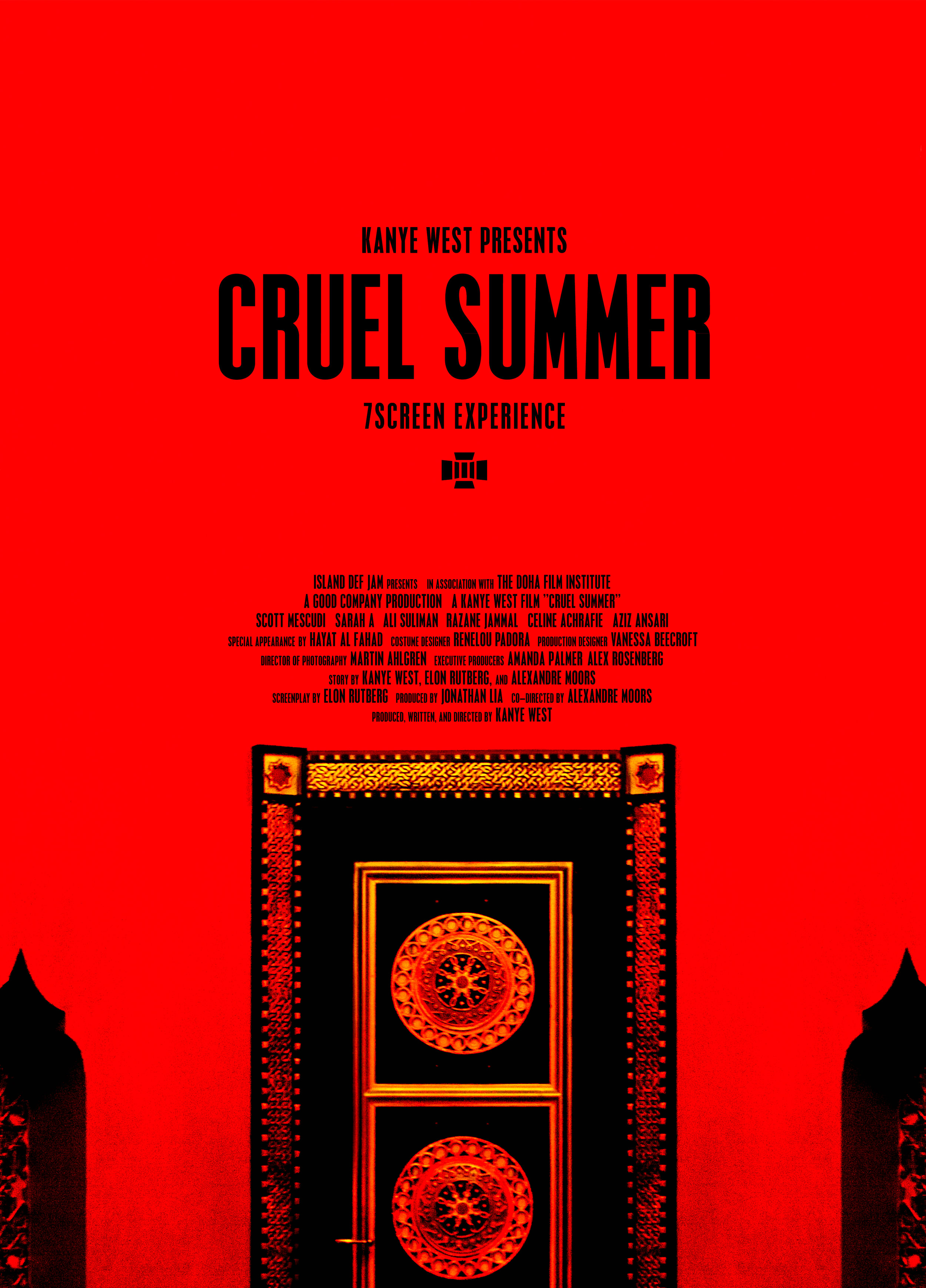
What I'm Working On: Kanye West's Cruel Summer
Edited by Robert Grigsby Wilson. No shit. Check out the reviews here and info about the building here.
Quick Avid Tip: Display your UNC File Path in the bin!
Okay, just a quick tip I worked out yesterday while I was trying to organize dailies for a documentary I am working on. The producer/directors had organized everything I needed to build out the Avid project on a hard drive: hours and hours of Quicktimes, all sorted out by subject or location. I was going to import them in one fell swoop, but I needed some way to organize the media once it came into the Avid. As it was, all the media arrived in one big bin. This is where the UNC File Path comes in. For those who don't know, the UNC File Path is short for Universal Naming Convention and is basically a piece of metadata that tracks the folder directory location of every imported piece of media into Avid. This is how, when you go to batch import, the Avid remembers where your imported Quicktime came from. It records it in the UNC File Path.
So back to where I was. Now that I have all my Quicktimes imported, I needed a way to display the UNC File Paths so that I could organize the media into separate bins. The hard thing about this situation is the the metadata will not display in every type of Avid project. Currently, I'm working in an SD 29.97 project since most of my media is HDV and DV. When I go to my Bin Headings...
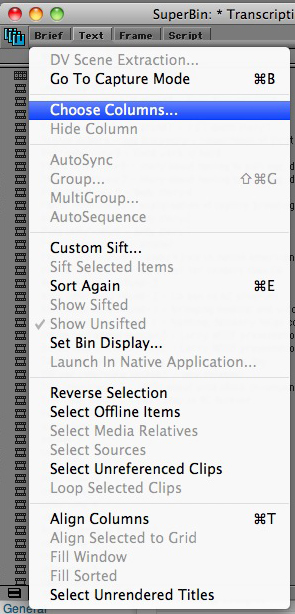
...and I try to select UNC File Path, it's not an option for me.

Ahhhh! Why, Avid, why? Why do you torment me by knowing this information and not displaying it?!?!?
Never fear, though. When it comes to the task at hand, the Avid will give me everything I need. Currently, the UNC File Path will only display in a 24p Avid Project. "But Rob, my project isn't a 24p project?" No sweat! In current versions of Avid Media Composer, you can still open and view video media of any project frame rate in any other project frame rate. That means that you can still take a copy of your bin and move it into a 24p Project, view everything, organize it into any order you want, and move it back into your native project when you're done.
Do like I do: create a 24p project with the Film radio box checked. I called mine UNC File Path, so that I can keep it forever.
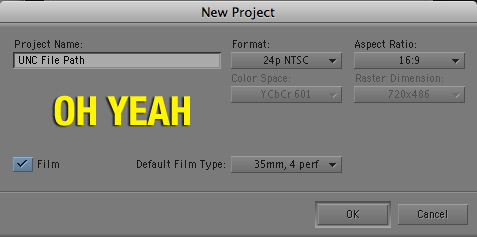
Now, make a copy of your bin that has the media you want to see the UNC File Path for, and copy it into your new 24p project.

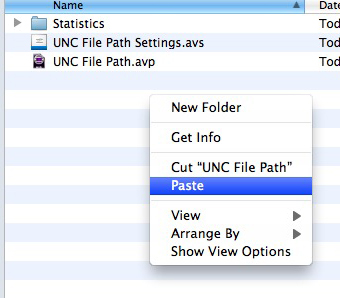 Do the same thing as above: go to select your Bin Columns, and then, like magic, it appears. Yay! Go to town!

Now a quick caveat to this tip. Thus far, I have not been able to make the Avid display this bin column in every type of project. My tip is limited to bin and clip organization. If for some reason you need to create any media, do NOT do it in your 24p project. Sort the master clips into new bins and bring it back into your native resolution project. Sure, it's not perfect, but it's better than what I was doing before I figured this out. Happy Editing!
PS - Oh yeah...hey Avid! Can you fix this please? I shouldn't need a work around. Lovingly, Rob.
Why FCPX getting lobotomized means job security for editors. Yes, I'm serious.
A quick thought before I get into my rant: don't you just hate it when your day job takes you away from something you really want to be working on? Right after Apple's well-documented, well-staged NAB presentation of the new features of FCPX, I went right to Wordpress and started drafting an article with the title: "What if FCPX is not awesome?" I then proceeded to go right back to my 60-hour-a-week gig with little time to think about blogging. Smart, Rob. That was months ago. Now that I'm back to funemployment, all I can think is how I wish I had finished that article. Instead, I'm here with my late-to-the-game opinion.
The thoughts I wanted to get down on paper the internet were a few musings on how big a gamble it was for Apple to completely re-write FCP and how many changes it could create in our industry if it was a flop. I wanted to talk about how, if indeed FCPX was indeed not awesome, it was going to tarnish Apple's reputation as a company of not only great consumer apps like iPhoto but also high-end professional ones like Final Cut Pro and Logic. I was going to prognosticate that Adobe and Avid would be jumping for joy, but I was also going to say how worried I was if suddenly our entire post-production ecosystem is devastated.
So now I say, with no great joy and without getting into too much more hyperbole: FCPX is not awesome. I won't go into listing out how FCPX has major problems. Chances are, if you ended up here, you already know most of the issues. If you need a refresher, check here, here, here, here, and here, and read a simple list of what it simply does not do anymore here. Or you can just watch this video made by Conan O'Brien's editing team (shouts to @robtheeditor and @ddandthecups) which basically sums up everything you need to know about the consensus opinion:
[youtube=http://www.youtube.com/watch?v=LxKYuF9pENQ&w=400&h=260]
So then where does this leave us? Well, for starters, disappointed. I have been using Final Cut Pro since 1.0, the very beginning. It was my first real introduction to non-linear editing. Hell, I did ten times my film school projects in my dorm-room on FCP than I ever did on any of the school's editing stations. I certainly knew more about FCP then Avid or Adobe when I left school. FCP was a welcomed addition to the marketplace because it was relatively inexpensive, easy to use, and robust. To see it now neutered, that's a hard pill to swallow.
But we're here now, so eventually we must reach the last stage of grief: acceptance. We must accept that now there is one less professional-grade editing software on the market. Our baby has been put out to pasture. But lo-and-behold, part of me actually feels relieved and excited about the future of post-production. Could it be that Apple has actually helped us? "But Rob, whatever do you mean?" you say. The key is this: barriers to entry.
About a year ago, I wrote a two-part piece on getting into the Motion Picture Editor's Guild (Part 1, Part 2). In it, I wrote about inexpensive non-linear editing systems and the problems that poses for making a living as an editor:
Experience aside, one once needed access to extremely pricey equipment to be able to hone one’s skills and practice as an editor. This provided an extra barrier to entry for anyone trying to get into the business. With the introduction of [Final Cut Pro], it has become easy for any person with about $5000 to be able to create a broadcast-capable editing system. [...] That has made it easy for young kids in high school and college (I’m speaking about yours truly and many following after me) to learn the skill of editing quite easily.
But today, it seems the tide as shifted back somewhat. Not completely, but somewhat. At the time I wrote that, the $5,000 number came from my loose budgeting around a Mac laptop, a copy of Final Cut Studio 3, some extra RAM and peripherals, and maybe some hard drives to boot. I was not considering the $2500 price-tag for Avid Media Composer or Adobe Master Suite. It seems now, though, that my math should be adjusted, because I would never call the current version of FCPX broadcast-capable. And given that math, it seems that a broadcast-capable edit suite just went up in price.
In the past, many new post houses and editors chose Final Cut Pro over Avid or Adobe because of budget. There were always small arguments to be made for which fit the required workflow the best but, in truth, all three basically provided the same functionality. The exception to this was that FCP cost much much less. Since the release of FCPX, though, the paradigm has changed. Now, I'd be willing to bet that the average beginning filmmaker will spend their money on the new FCPX while most professionals and production companies will focus on Media Composer and Premiere. And why shouldn't they? FCPX is easy to use and does a lot of thinking for you, while Adobe and Avid provide support for nearly every type of production and the architecture of the software is scalable up to the largest projects. But, because not every level of editor requires the same software, us professionals can breath a sigh of relief about some young kid with a Mac and FCP asking for half our rate and thusly eating our lunch. It's not that easy anymore.
Before, someone could buy FCP7 and cut their home movies on it while reading the press about how Walter Murch and the editors from The Social Network used the same software to edit Oscar-winning films. (Side note: has anyone interview these people about for their thoughts on FCPX? Can someone please get on that? Send me a link!) While that was great to imagine, believing that was simply drinking Apple's Kool-Aid. Not all editors need the same software. Here's an example: in-the-field documentarians and journalists don't need a particularly robust editor. They just need to get their footage in, view it, tweak it, and spit it out fast to Youtube, CNN iReport, and so on. They don't need advanced media-management tools for dealing with terabytes of footage. They don't need power-windows and secondary color-correction effects. They don't need the ability to export data and sequences for Pro-Tools, Resolve, or Smoke. And now there's software to serve their needs. This is good.
But this new version of Final Cut Pro is also good for editors who need more advanced tools, in the way that it pushes professionals to harder-to-reach software. There used to be two levels of software: consumer and professional. Now, though, Apple has created a new class of software that requires an intermediate-level knowledge of editing and post, but not a mastery. And so, for those of us out there who are required to be masters, the talent pool just got smaller. And that's also a good thing. Now, I don't need to look over my shoulder as much, wondering when the next development is going to take away the need for an Assistant Editor, or whether some new hotshot film director is just going to cut out the need for an editor entirely and cut their projects themselves. Apple is revolutionizing the prosumer market, and there's no shame in that. From where I sit, the more prosumers we have, the more it separates me from everyone else.
PS: Just caught this as I was writing this, from the ever-excellent Revision 3 show Film Riot. It's another good primer on the good and bad of FCPX, and recommends it exactly to who the software is targeted to: the beginner. Please let me know what you think in the comments. I'd love feedback on my thoughts. Also thanks to @therealjimhall for his feedback.
One other small post-script: I fear for the life of Aperture and Logic. If I use those programs on a daily basis, I'd be very afraid of this trend.
[youtube=http://www.youtube.com/watch?v=-JBZXQV7hTI&feature=player_embedded&w=400&h=260]
Quick Avid Tip: Rename your MXF folders!
Okay folks. A quick tip here about ways to organize your media when you're working on different projects on the same hard drive. It requires a little maintenance, but it will work just as well as your current system and provide for an easy ability to manage media at the Finder level. Let's review by establishing the common Avid MediaFiles folder structure: Hard Drive/Avid MediaFiles/MXF/1
On every hard drive where you're currently carrying Avid media, your media lives in this folder labelled "1". But did you know that you could rename this "1" folder to something more project-specific? Apparently, as long as the folder is within the Avid MediaFiles/MXF folder structure and there are Avid Database files in there (those two MSM files in the folder with all your media), you can name your folder whatever you want.
But when would this come in handy? If you're managing multiple projects, or multiple phases of a project, such as offline and online on the same drive, this will be truly helpful. That way, if you ever need to consolidate, manage media, or do anything when you only want to affect one project's media and don't want to manage it in the Avid Media Tool, you have set yourself up to do this very easily.
As a example, I was recently editing a music video on my laptop. The media was stored locally on my internal hard drive. Another project came up and I wanted to be able to keep the other media on my hard drive too. So I took my current "1" folder, which I knew was only media from my music video, and I renamed it "Music Video". Then I imported the media from my other project. When there isn't a "1" folder in the Avid folder structure, Avid will automatically create one for you when creating new media, so when the media was done importing, I simply renamed the newly created "1" folder to the name of my other project. And bang, two folders, two projects. This came in handy when I wanted to take the music video to online on another system. Without needing to consolidate or manage media at all, I just grabbed my "Music Video" Avid MediaFiles folder and copied it to a new hard drive. No Media Tool necessary.
Here is an example of how I have my current work set up:


PS - Just a note: this only works to my knowledge on versions of Avid that use the MXF folder structure. I have not investigated this on old (but still perfectly useable) OMF-based systems.
File-Based Basics (c/o Splice Here)
The ever-brilliant Splice Here blog (soon to be Splice Now) by Steve Cohen lays out the perfect list of questions that every production should answer before they shoot one frame. If you or someone on your production team can't answer this question before you start shooting, STOP! and get it answered. Not knowing the answer can get you in to trouble. Original link: File-Based Basics « Splice Here.
- Production Which camera(s) are you using? Which audio recorder? What kinds of files are you creating? What frame rate, sample rate, timecode rate, raster size are you recording?
- Dailies Who’s doing them? What do you need for editing, review and conforming? Who syncs and how will they do it? Who backs up and when? How are drives being moved around; where are they stored?
- Editing What system will you use? What kind of drives/raid? How will you output cut material for review? What are you turning over to sound and music?
- Conforming Will you roll your own or have a post house do it? How do you handle visual effects created in your editing room? And those created by the vfx team? What kinds of files will you use for color correction? And for television, a crucial question — when do you convert to HD?
Thanks Steve!
The Editor's Guild (Part 2 - The Double-Edged Sword)
Are you curious about the union? This blog is a continuation of my previous entry on how you get into the Motion Picture Editors Guild. I thought it would be a good idea to provide a little insight into getting into the union. What I didn't realize is that it would devolve into an entire diatribe about the state of the Editors Guild in the larger Hollywood perspective. So I packed my first entry with information, and saved the rant for here. I guess I figured that it would be a good idea to keep my thoughts organized, no? These days, so much editing work in Hollywood is non-union. You can find nearly any type of production being done without the protections of the Editors Guild. But why is this, you ask? This is due cheifly to the introduction of inexpensive editing systems in the last ten years. Experience aside, one once needed access to extremely pricey equipment to be able to hone one’s skills and practice as an editor. This provided an extra barrier to entry for anyone trying to get into the business. With the introduction of Avid and Lightworks and then Final Cut Pro, it has become easy for any person with about $5000 to be able to create a broadcast-capable editing system. Now, all people need are talent, skill, and connections. (He says, as if it was nothing.) That has made it easy for young kids in high school and college (I'm speaking about yours truly and many following after me) to learn the skill of editing quite easily.
This situation has created a problem for the union because, given its current setup, its members maintain no monopoly on any tangible skill anymore. Unlike the other Hollywood unions such as SAG or the DGA, the Editors Guild places no requirement on its members to only work on union productions. In order to maintain your benefits, a union member must work 300 hours every six months. (Here is a link explaining the requirements.) This is a double-edged sword, because it allows union members to take advantage of all the non-union work but sometimes have to choose less union work over more non-union work. You can be a member in good standing but not be given benefits based on the fact that you have not enough hours in your given six-month window. Now, you can "bank" hours, which means that you can keep some of your hours if you work more than the 300, but it's not that simple because the bank is limited to 450 hours, meaning that you can really only keep your benefits for another six months without a union gig of at least 3-4 weeks. Not as easy as it seems, is it?
When it comes to getting non-union work, I have seen more better-paying jobs as an assistant editor there than I have working union. Typically, I do independently-financed union features, and that work typically comes with depressed budgets and depressed rates. Granted, at least these productions are union projects, where I can work for a depressed rate but still get my union hours, but the grass is not necessarily greener on the union side. Other work, like reality TV and award shows, can be well-compensating but not pay into your benefits at all. And thus, I am constantly left with a dilemma. Recently, I turned down a large amount of non-union work for a smaller amount of union work, because its cheaper in the long run to not pay for my own individual health insurance. But its only getting harder to make those choices. Starting in August 2011, a union member must work 400 hours to maintain benefits!
In today's post-production reality, it does make sense how the union has positioned itself. Their allowance for union members to work non-union without penalty has allowed me to keep working union but not lose out on all my previous connections. This is good. However, this has only contributed to the union's increasing irrelevance in this town. Unless the project is a high-profile film or scripted television show, it is almost certainly non-union. American Idol, the biggest show on TV right now, is non-union. The biggest producers of reality television right now are non-union. Many of the biggest post-production houses in Los Angeles are non-union. And union people will take those jobs because they pay. I am no fan of this. Let it be said, though, that all I am trying to do is make clear the realities to people who are looking at joining the union. I don't know how to fix this. I just know I wish I could keep my benefits and be able to pay my bills. Sometimes I wonder if that will ever come to pass.
The Editor's Guild (Part 1 - Getting In, and is it worth it?)
 An important question I often get is "how do I join the union?" This question comes from many people I meet, from established editors to the young people just starting out in the Hollywood. The catch is that the answer isn't at all that simple. The question should be: "should I join the union?" Putting it simply, if you're asking that question, the answer is not quite yet. But that's just the beginning of the story.
The people who should "join the union" are people who have been offered a position on a union show and are either rostered or have some other loophole to exploit. Since the latter is a longshot, your best bet to joining the union is to roster. But let's slow down a minute and talk about why you would want to join the union. The Motion Picture Editors Guild is a valuable organization of many of the most talented post-production artists in Hollywood. It provides great benefits: health insurance, a pension plan, protection from overwork/underpay, free screenings and seminars, and finally great discounts for things like software and cellphone plans. (For a complete list, check out this link.) But with every benefit, there is a downside. But that's another rant.
So what do you need to join the union? Well, the answer is you need to work non-union. You need to work, be paid, and be credited as an editor (or whatever editing title you join the union as, i.e. Assistant Editor, etc.) You can make below union scale. You can work inconsistently. All you need to have is the ability to demonstrate that you have 175 days of non-union work experience in the three years prior to applying. If you're joining as an Assistant or something else, the day requirement will be even less! Now, let's say you've met these requirements. What should you do? Well, you should roster. What is rostering? Rostering is a list of membership-eligible people who the union says are qualified for work, but haven't gotten their first union job yet. It's a sneaky way to keep you on their radar and to keep you from lying when you say "yes" if someone asks about your union status. Of course, you don't get anything tangable for rostering besides the piece of mind, but the advantage this provides is it allows a potential union employer to judge your resume without worrying about whether you're in the union or not. For information about what to do once you're at this stage, click over to this link at the union's website.
Now, if you've made it this far, you must be asking yourself "how do I get a union job?" Honestly, that's the hard part. Meeting people who could potentially hire you on union productions is entirely based on who you know. Not being able to help anyone with that, I'll address the circumstances under which you should jump from rostering to actually becoming a full member: don't do it unless you are offered a job for more than a few months. The initiation fees are hundreds of dollars, and in order to get any of the health benefits, you need to work an initial 600 hours to qualify, so don't do it if you won't be working enough to justify it. You should be very confident that you'll be working for months, not weeks, and if you're not making enough, keep your money and wait. I personally waited two years between rostering and joining.
And what is it like on the inside? Well, it's kind of a double-edged sword. I'll save you the rant for Part 2 (forthcoming) but it certainly can be awesome. The hardest part is to keep working union shows enough to maintain your benefits. But if you can do that, it's a great thing to have. My only question is whether its sustainable in its current model. But again, I'll save that for Part 2.
For more information, leave a comment here or head on over to the Guild's website. Check back for my next entry in the saga of the Editor's Guild...
Avid Re-Tweets robgwilson.com. THANKS!
 Thanks!
Avid kicks Final Cut when it's down. [Update: FCP still kicked and down.]
[youtube http://www.youtube.com/watch?v=ffk8Fg6XMak ] So this week at NAB Avid released details about their upgrade to the Media Composer editing system. Talk about gamechanger. Avid now allows for dragging and dropping in the timeline, native Quicktime AND RED support (and I'm not talking about Quicktime Proxies here), solo and mute buttons in the timeline, a much stronger user interface, I could go on... Hey Apple and the uninspired team at Final Cut Pro: now that Avid has co-opted all your awesome features, what about you maybe making some of your own innovations?
It's been a long time coming for Avid. Granted, none of these improvements would have ever come had Apple not entered the market. The Cupertino computer giant does deserve that credit. But when it comes to making decisions about what software I'd use on my next job, any argument against Avid has officially been nullified for me. I used to have an expression: Final Cut Pro is a great editor on top of a crappy media manager, and Avid is a so-so editor on top of an awesome media manager. Today I officially put that to rest because Avid has proven that they are willing to change.
As for Final Cut Pro, I can't say the same. It's been months since I purchased my upgrade to Final Cut Pro 7, and I have to say, I'm not about to open the box and install that POS on my computer. Sure, there are quality cosmetic changes to the editing system, like the introduction of ProRes Proxy and 4444 and the colored locators that trim with your edits, but that masks the fact that Final Cut Studio 3 actually runs SLOWER than Final Cut Studio 2 [link 1] [link 2]. And Avid already has the best project-sharing functionality, so tell me what I should choose Apple next time around?
Apple entered the market strongly and has done great things to bring professional editing to the people. But the truth is Avid has responded by doing laps around Apple while Apple is distracted by their innovations at the consumer level. It's high time that Apple either sh*t or get off the pot when it comes to Final Cut Studio. Sell it or fix it. I'm tired of dealing with this.
UPDATE: Ask and ye shall receive. No sooner than I write this post do I see and article from MacSoda that quotes the almighty himself Steve Jobs as saying "The next release will be awesome." Scanning through the comments, there's a mixture of excitment and true disbelief as to whether that is indeed true or simply spin. Color me undecided, but at the moment, I'm still waiting for something more than Steve's curt emails.
If you disagree with me, please comment. Check out the first comment left already by Zach Fine, who presents an excellent rebuttal about the FCS3 upgrade and makes some great points about workflows and benefits. I still disagree about the state of Final Cut Pro, but hey, he's a smart guy and he makes some great points.
Whoosh! - The story of my life
[embed]http://www.funnyordie.com/videos/f1fb270652/whoosh[/embed] I know this has made it around the interwebs already, but here it is again: a sad but true tale of my life as an editor. I was almost brought to tears during the part where the editor calls his family.
Artbeats Free Clip of the Day! Free stock footage!
 Hey all. Do you use stock footage ever? Think you might want to keep some on hand, for that random occasion. If you ever need that great clip as a background or insert or establishing shot that you couldn't go out and shoot, Artbeats is there to save the day. Well, Artbeats is now giving away one free clip of stock footage every day! And now you can start building your collection through their Daily Free Clip program. Just register for an account (also free!) and every day you can download either an HD, NTSC, or PAL quicktime for you to keep. Unfortunately, they're not letting people download anything higher than that for free, but who's complaining?
All of Artbeat's material is royalty-free unlimited-use, which means that you can use it over and over again without needing to pay them anything, as long as your project isn't made of more than 25% stock footage. Right now all the HD footage you get is Photo-JPEG, but the footage looks great and they claim there is negligible loss in quality as a result of the compression. Obviously, it's not ideal, but hey, IT'S FREE! Check it out and get started on building your stock footage collection...
Review: LogMeIn - Save the day from your iPhone.
 Imagine this scenario...you're an assistant editor, it's midnight, you're at home, and all of sudden the director calls. They want to have a DVD of the current edit for the film you're working on ready first thing in the morning. This is about the time when you have that sinking feeling because you know you're headed back in to the office...an office which is across town. And on top of that, it needs to have burn-in on the picture because it's going to go to a vendor after he's done. A few years ago, this would've meant you'd be packing your bag to spend the a short sleepless night on the floor under your editing bay. But no longer, faithful A.E. - we are now saved.
Enter LogMeIn, the great series of programs that allow you to remotely manage your computers from any Internet connection. While its not quite fast enough to play back video (hopefully that's not too far away) you can certainly navigate all your assistant duties from your remote connection. From managing media to encoding Quicktimes to anything you can imagine, you can do it all without needing to be there. All you have to do is create an account, download and the program, and presto! You can visit that computer from the internet.
Imagine this scenario...you're an assistant editor, it's midnight, you're at home, and all of sudden the director calls. They want to have a DVD of the current edit for the film you're working on ready first thing in the morning. This is about the time when you have that sinking feeling because you know you're headed back in to the office...an office which is across town. And on top of that, it needs to have burn-in on the picture because it's going to go to a vendor after he's done. A few years ago, this would've meant you'd be packing your bag to spend the a short sleepless night on the floor under your editing bay. But no longer, faithful A.E. - we are now saved.
Enter LogMeIn, the great series of programs that allow you to remotely manage your computers from any Internet connection. While its not quite fast enough to play back video (hopefully that's not too far away) you can certainly navigate all your assistant duties from your remote connection. From managing media to encoding Quicktimes to anything you can imagine, you can do it all without needing to be there. All you have to do is create an account, download and the program, and presto! You can visit that computer from the internet.
It works with Windows and Mac, is incredibly secure with AES 256-bit encryption, and best of all, they have a FREE VERSION! While LogMeIn offers many different products, but if you're a handy Assistant Editor such as myself, and you've got an iDisk or some other type of cloud storage, then all you need is LogMeIn Free. Also, if you've got $30, it is also totally worth purchasing LogMeIn Ignition for the iPhone or iPod Touch. Now you can remotely log in to any computer you've registered with LogMeIn, as long as you've got an iPhone and an internet connection.
Obviously this is not a new concept. VNC remote management has been around for a long time. But this has a few twists I think make it the best. First of all, the entire list of your available computers is right in front of you when you log in, and you don't have to worry about IP addresses and other such networking information. Second, it works seamlessly on both Windows and Mac, so you only need to pick one app to do the job. Lastly, it's all user-friendly, with one of the best iPhone apps I've seen for remote management and truly helpful options when it comes to the desktop mirror.
I can't count the different ways this product has saved the day. One day, an editor called because she needed me to help her find her project files, which had been moved from their current home on her hard drive by no fault of her own. Went to LogMeIn.com, logged in to her computer, and found the file. Bam, five minutes, day saved. Another time, I was on a day trip on a Saturday when a director wanted to come into the editing back to screen the film. He could press play, but I didn't want to walk him through the hour of rendering that needed to take place to prep the film. So I logged in from my iPhone, strung out the reels, and rendered the film. When he got in, all he needed to do was hit play, and it was ready to go. To finish up on the story I started at the top, to save the day, I strung out the reels, applied the burn-in, and send the Quicktime Reference to Compressor, all in the same amount of time it would've taken me were I sitting right there, and went to bed rested. In the morning, I ran the MPEG-2 through DVD Studio Pro, and the DVD was ready before the director even showed up.
Do yourself a favor and go download this right now.
A quick follow-up...(Thanks Bruce Sharpe!)
Hey everyone. First of all, a quick thanks to Bruce Sharpe, CEO of Singular Software. His company made PluralEyes, the company I referenced in my previous Dear Production entry. A few days ago posted my blog on his twitter feed. That's big for someone like me who is brand new to this web 2.0 linked economy. He also recommended a good story about I Love Lucy and how the show really innovated multi-camera production. You can find Bruce on twitter and on blogspot, and probably at NAB this week. From his twitter feed: Here's the video I recommended about his company:
(I'm just learning how to embed video on Wordpress)
[blip.tv ?posts_id=1129108&dest=-1]
Here's the video I recommended about his company:
(I'm just learning how to embed video on Wordpress)
[blip.tv ?posts_id=1129108&dest=-1]
Also thanks to Lindsey Rundell, my assistant editor amigo, currently working on . She read my post and told me about Quickeys, a macros program which should make half of Avid Multi-Grouping easier. The program allows you to program a series of keystrokes into one keystroke so that, in her words, "It does the F1-6 deal for you AND adds the Aux TC." It looks like it would be a great help, but nothing is a replacement for proper production techniques. Thanks Lindsey!
Dear Production: JAM SYNC YOUR DAMN CAMERAS!
Okay, I'm not one here to criticize people in production. Post-production is almost a completely different beast from production and I've walked very little in the shoes of the camera department (enough to know I didn't want to do it for a living). That said, DEAR PRODUCTION: JAM SYNC YOUR DAMN CAMERAS!!! For those unaware, jam syncing is a process used by productions when sound is recorded separately or when multiple cameras are shooting the same event. It's used in features, television, music videos, documentary, and especially reality television. Simply put, the production team uses a machine to send continuous matching timecode to each camera. Once the footage lands in my hands, that allows me to simply hit "Sync By Timecode", create synced groups with every angle's action lined up, and start editing immediately. All production has to do is occasionally set their timecodes to match that machine. Working with it is great...IF it happens.
What production doesn't understand is that if at any point the timecode drifts out-of-sync - at any point - then the amount of time I have to spend syncing clips increases exponentially compared to the amount of time they delay stopping to sync their cameras. And every camera has a tendency to drift out of sync. All too often, they decline to be diligent. On one project, this showed up during a live-to-tape session where six cameras and an audio recorder were recording the same group meeting. NONE of these cameras were synced. Despite the fact that each camera was stationary and the location did not move, there was not even a slate to provide me with a point of sync. Each clip had to be synced according to some random point in the action. And that took over two days with a second-shift assistant editor working on it as well. If they had simply jam synced, this would have taken us minutes, not days. And I should say that while this was a bad experience, I'd be a rich man if I only had a dollar for every time I had to deal with timecode sync issues.
Here I'll post what some of you may be looking for: Tim Leavitt over at View From The Cutting Room Floor has a great blog post about fool-proof Avid MultiGroups. That describes the process you have to go through if you're editing in Avid and you have the problems I describe here. If you're working in Final Cut Pro, here's a great post from our dear friends at the Los Angeles Final Cut Pro User Group (who are totally awesome, let me just say) about syncing multicam clips. As an added bonus, you should check out this little plug-in gem called PluralEyes. It's a Final Cut Pro plug-in that scans your audio waveforms and aligns your all your clips in your sequence so that you never have to sync again! It's only in beta phase now, and I've downloaded it but haven't had the chance to use it yet. I'm looking forward to the opportunity. This video also has a great explanation of what I'm talking about as far as jam syncing. Email me if you need any additional help. I'll see what I can do.
Just to make a final point and show I'm not really just sore about my experiences but that this is really a good idea. Imagine that this happens on a Michael Bay movie. There's some action sequence that has ten cameras covering some big explosion. Imagine getting all that footage and not having timecode to sync the entire action. It would be hell to edit, right? Well, my dear friends in production, please remember: jam sync your damn cameras.
-Rob